What is Decide, and who is it for?
Short answer: Decide helps you protect time for what matters to you — work, family, sleep — by setting aside the specific apps that can wait, on your own iPhone, for as long as you choose.
How it works
Decide organises your time into areas, such as Work or Family. For each area you choose the apps that can wait, then protect it now or at times you schedule.
While an area is protected, opening one of those apps shows a screen reminding you what you chose, with Go back and Change in Decide. Decide uses Apple’s Screen Time to do this, on your iPhone only.
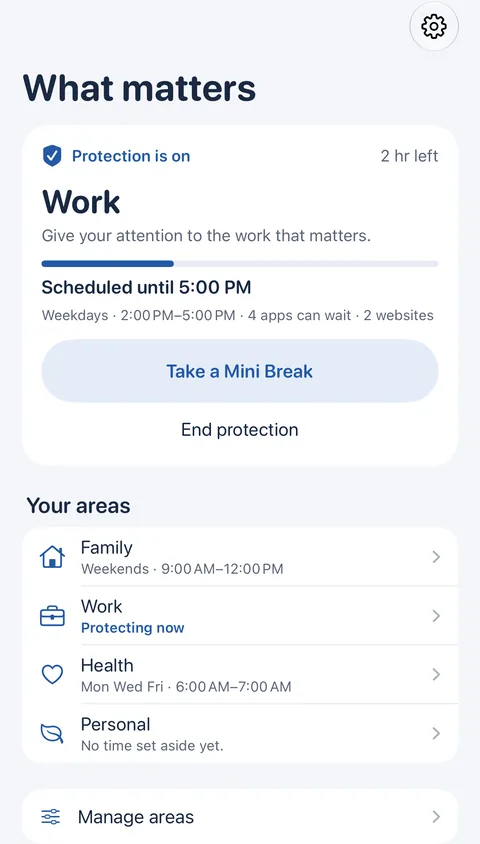
What you see on Home
- The card at the top says what is protected now, and until when.
- Take a Mini Break opens one protected app for a few minutes.
- End protection ends it, whenever you decide.
- Your areas lists every area with its times.
Who it is for, and what it is not
Decide is for adults who want fewer interruptions from their own iPhone, on their own terms. There is no account, and your setup stays on your iPhone.
Decide is a focus tool for your own iPhone. It is not parental control, and it is not a security or safety system: you can always end protection yourself.
Still need help?
Write to us by email. It helps to say what happened, what you expected, and your iOS version. In Decide, Settings → Contact Us opens a message to the same address.